RECAP: How to use LinkedIn in 2025 as a page and as a person

When LinkedIn was taken over by Microsoft a wag joked at how they hoped they wouldn’t change that fun, freewheeling spirit that the platform had.

The joke was, of course, that LinkedIn was the dull older brother of the socials where he hung out with accountants and spoke about his career a lot.

However, for a long time that dull older brother has quietly became a calm haven from the river of abuse that other networks have you wade in. It’s also a place I get a big chunk of my insights and reading from.

Besides, with the world turning upside down many people are keeping one eye on LinkedIn for career development.

If you missed it, here’s a recap on my research on what makes the most effective LinkedIn content for a public sector page. The top ranking thing is a carousel of images.

You can read the full post here. Interesting that the broad findings have been confirmed by the Social Insider blog.

For LinkedIn pages, advice, help, celebrating staff and opportunities work best. 

For your own profile, something helpful or insightful always goes down well. You’ll find Linkedin much more work-focussed than other platforms. But don’t worry, TikTok is great for recipes, the BBC Sport app covers breaking scores and Facebook groups can be good for local news.  

As a platform, LinkedIn has been innovating and I thought it an idea to recap on some of the developments for 2025. Some are tactical and some are strategic. Some are for you and some for your page.

#1 Bring out your people

In 1999, the groundbreaking ClueTrain Manifesto was published and was a map for social media well before Mark Zuckerburg even went to college. It spoke about how some people from companies were cool online and if they didn’t have a tight reign they’d be among the people – not brands – they’d turn for answers.

The people we turn to from LinkedIn from LinkedIn are right there in front of us. So, Heather Timmerman Moller is the named face who wrote the update on how video ads can be made through Canva. You can find her online here. 

It’s not the corporate blog, there’s a name.

So, that’s the first lesson. Have your senior people use their own profiles if they are happy to do so to share the news. 

This makes sense. If the senior accountant is talking about the new accountancy system the organisation is using to help save time and money they are doing so to their audience of accountants. That network will be far stronger with accountants than the corporate page will have. By all means share it to the corporate page too. But that’s not where accountants will be.

What people does your organisation have?

“Say it louder for the people at the back credibility travels through trusted voices.” – Wensy A, creative thinker at LinkedIn. 

#2 Video, video, video, video

LinkedIn has been comparatively late to the party with video. It was only in 2017 that the platform allowed video to be uploaded natively. 

By 2025, LinkedIn has more than caught up and so have its users. In 2025, watching video had increased by 36 per cent year-on-year. In the attention economy where seconds count this is really significant. Your followers are also 20 times more likely to share a video than any other piece of content

For a LinkedIn ad, the video should be less than 30-seconds. But interestingly, the non-ad video dropped into your timeline can be maybe up to two minutes, they say. That’s also interesting. It steers away from the 15-minute ego stroke of someone senior talking at length without much purpose.

So, if you are looking after a corporate page, the senior person’s soundbite can work. If it’s you, your own video can work well. It’s something I keep meaning to do myself.

LinkedIn themselves have published some video best practices.  This is hugely useful when this happens. It’s a much firmer peg to hang a hat on. There’s something revolutionary in the notes. Using a mic for sound, subtitles and 9:16 – portrait shaped video – are all good notes.

On top of that there’s some technical specs. This image is especially useful as it shows you the ‘safe’ areas where its okay to add text and other things.

You can read the full video specs guide here.

#3 Proceed carefully with AI 

LinkedIn’s own 2024 Marketing Benchmarking report said that they’d be expecting a quarter of people would be using AI in 2025. I’d say that was behind the curve. Don’t feel obliged to use AI on LinkedIn but do be obliged to learn safely.

For me, there’s the idea creation that AI can bring and the content creation. For content creation, that’s audio, video, music and images. I’m not sure that that’s where public sector AI use should be right now. I think right now, the public are hesitant about AI and while they don’t mind seeing AI help diagnose cancer more effectively there are other things they are less keen on.

Using AI to help sub-title the video clip you may post to LinkedIn would be a genuine timesaver but once again, do check against delivery. AI can’t do regional accents or place names very well. 

On the platform itself, LinkedIn has offered some AI tools to help recruiters narrow down the right people. There’s also some AI ad tools. Should you just go ahead and use them anyway? I’m not sure that’s such a good idea. Experiment on what the tools may be but for me, don’t use them in anger until you have a policy.

Interestingly, LinkedIn themselves have made great efforts to stress that human content is the best content if its AI you are looking at.

#4 Develop a safe LinkedIn use flow chart

A safe use flow chart may be useful for you.

This isn’t from LinkedIn itself, rather my observation of its use in the public sector. This came about from delivering a session to NHS people. They got the importance of using LinkedIn but they just didn’t want to say the wrong thing. So, they went away and developed a sensible use flow chart.

On the chart was advice not to endorse a particular product unless senior people were fine with it. They also wouldn’t say anything about a joint project unless the other people in the project were okay. However, they could talk about industry trends and observations in the abstract. 

#5 Extra tools for pages

While I’ve blogged a lot about encouraging people in the organisation to use LinjkedIn you may also like to know that Premium Company Pages launched last year cost about £50 a month to use. They give bits of marginal additional functionality like a list of people who have seen your page and an AI-powered writing assistant that I’m not mad keen on.

You can already see the absolute basics with the LinkedIn creator pages which is the ABC of content creation.

#6 Live Events

You have the ability to create an event through your LinkedIn page. For me, this is the most under used tool on the whole of the site.

If you are looking to explore these the best tip would be to go and register for some to see how they work and see how the can be improved. The best live events are ones which are created with LinkedIn in mind. So, in other words a 30-40 minute chat on a particular subject with the ability to ask a question. The LinkedIn events page is useful to help you with this.

Since March, you can run a live event through Zoom itself.

Failing that, if you are planning a conference or similar event then adding the date and time to LinkedIn along with a sign-up form is the answer.

#7 How often to post 

If you are not used to LinkedIn and maybe you are exploring it in detail for the first time spend some time on the platform first. Scroll, read and see what you can learn. As you get to know the language of the platform you’ll see how it all works.

Think about commenting on a post first. That’s straightforward. You can add to a discussion or just say ‘thank you.’ 

I’m never that keen on suggesting the number of times to post per week. If its good enough then post it. You’ll get a sense of if its good enough because you’ll get feedback from comments and likes. Don’t worry if it doesn’t work first time. It’s called a stream for a reason. The stream passes and new things come down towards you. Tomorrow is another day.

I deliver training to help you make sense of the changing landscape ESSENTIAL AI FOR PUBLIC SECTOR COMMS, ESSENTIAL COMMS SKILLS BOOSTER, ESSENTIAL MEDIA RELATIONS and ESSENTIAL VIDEO SKILLS REBOOTED.

Creative commons credit: Piccadilly, 1986 by Stella Gardiner.

GUEST POST: Three ways to re-purpose your content and grow your public sector LinkedIn page

LinkedIn is sometimes a tough nut to crack. But it can be a positive channel as Connor McLoughlin of Wokingham Borough Council says.

LinkedIn? Shouldn’t we give control to HR? That’s where people go to find a new job right?’ 

Sure, it can be used for recruitment, it’s where people go to talk about work after all.

But LinkedIn is a legitimate news feed. And it’s one where we can adjust our messages to help reach more even more of our residents and partners.

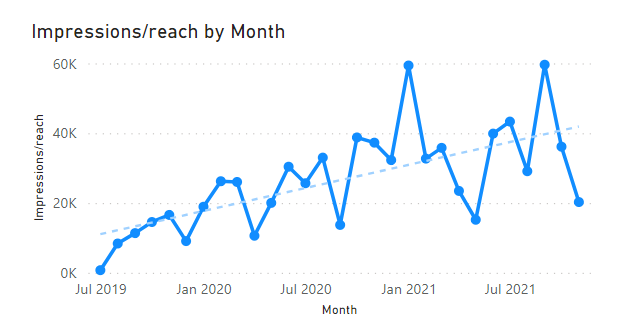
Since we opened our account at Wokingham Borough Council two and a half years ago, we’ve more than doubled our followers by repurposing content with the right emphasis. 

As this has grown, we’ve found that more people who see our content each month has trended upwards (see graph below). 

You don’t start with a NextDoor-sized following (those generous people giving us five-figure audiences), but you’ll probably have a few thousand. We started at 2,500.

We’ll top 400,000 impressions in 2021 and that’s the kind of awareness which I’m sure all public bodies want to tap into.  

Easier to repurpose

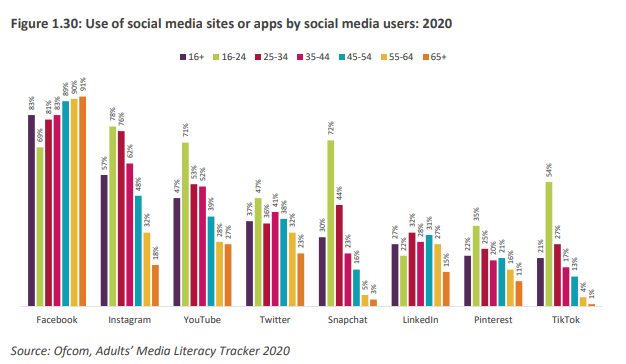
The Ofcom Online Nation 2021 report says 27 per cent of adults aged 16 or older use LinkedIn, making it the sixth most popular social media platform. 

But crucially it’s the third most popular where the content is arguably not video-led, like Instagram (second), YouTube (third), Snapchat (fifth), and TikTok (eighth).

Your Facebook and Twitter content is more easily put onto LinkedIn than any other channel. 

If you’re lucky enough to have one of those social media scheduling tools, you might just need to tick an extra box and make a few changes to your copy.

A simple change to emphasis, or bringing something else to the fore, maximises engagement for LinkedIn. Things we find which always work are:

  • Shout about great news for your area
  • Leverage your partners on shared projects
  • Celebrate your colleagues and their successes

Example: Safe place for successes

For example, this post about the borough being a healthy place to live here.

And this post about investment.

We find LinkedIn is a place where our great news for our business and our area are celebrated by our audiences. 

New film studios in our area and our borough coming top of the ONS health index (see above) are two examples of this in 2021. Both had more impressions (6,000+) than we have followers (less than 4,500 at the time of posting).

On Facebook these items were dampened with pessimism from a few residents, the type all local authorities deal with on that channel.

But on LinkedIn we only see positivity and it helps us to higher engagement rates. Colleagues, residents and partners amplify this with their networks and help us celebrate the success.

We are always happy to be the hook people work from to promote something themselves.

Example: Celebrating teamwork

Here’s another example this time also involving video.

And also this post here.

In the public sector partnership working is essential. It’s also essential it’s celebrated. 

We find when we draw these partnerships out in our LinkedIn posts, tagging our partners in, they always perform better. 

The companies/businesses, and sometimes their staff, we work alongside want to mark these too. People are proud to work with us and bring benefits to our residents.

We’re fortunate to have several large construction projects taking place across the area, linked to additional housing in our borough in recent years.

There’s also a chance to share content, hence some of the excellent video content we’ve been able to promote in the last 12 months.

Put your colleagues at the front of the story

Our work is done by great people. LinkedIn is the right place to talk about them and what they do for us.

Look at your stories. It might work better on LinkedIn if instead of talking about the thing, we talk about the person who did the thing. 

Or we make sure we factor the people who were involved into the wording of a post in a way we wouldn’t on another channel.

We’ve all had to re-nose a news story or press release, apply the same to your social content for LinkedIn and you’ll see the engagements jump up.

And if you are using LinkedIn for recruitment, no potential staff member is going to be deterred by a workplace that shouts about the great work of its colleagues. 

But what does the data tell us?

These points of focus have helped us more than double our following in two years, with consistent growth in the number of people who see our content and engage with it. 

In the last year, we’ve seen total engagements alongside audiences of local authorities with followings five times ours (see table below). LinkedIn provides this data for ‘competitors’ in its native analytics if you’re interested. 

There’s no competition for audience but it helps to know if what we’re doing is resonating and providing value to those who do see our content relative to similar organisations.

CouncilFollowersPostsEngagementsAverage engagements per postEngagements to followers ratio
Wokingham Borough Council5,6402888,39329.141.4881
County council 126,1112168,54339.550.3272
County council 226,6741958,77745.010.3290
New, large unitary4,9834887,01614.381.4080
Similar sized unitary6,5362412,84811.820.4357

Data correct as of 13 December 2021

Make it work for you

If it’s a channel you’re already using or one you’re looking to unlock, these are a great place to start with adapting some of your content from other channels. 

Lift and shift. Repurpose with purpose. It won’t involve a 9:16 video. 

You could bring lots more eyeballs on some of your biggest projects and get to highlight your perfect partnerships or celebrate your colleagues. After the last few years, we could all do with a bit of the latter. 

Connor McLoughlin is senior communication, engagement and marketing specialist at Wokingham Borough Council.

PRO VIDEO : How to get the most out of LinkedIn video

At last, LinkedIn has joined the race to encourage people to consume video on the channel.

The long-predicted move sees the platform for professionals allow you to upload directly to the site.

How you can upload video to LinkedIn

Easy. You can do this by adding a video when you are adding an update from your own profile from a PC. There is a video button as part of the range of options. You can also shoot video from your phone or add a video from your camera roll.

At the moment, this is limited to updates in your own name. You can’t do this yet from the company page. For me, this isn’t a huge loss. People connect to people on LinkedIn and let’s face it, the company page is a pretty dull place.

So, cat memes on LinkedIn now is it?

What this does is add some extra dimension to the field. This is unlikely to see an explosion of cat memes on LinkedIn. This isn’t Facebook. But it does mean that when you are looking to communicate a new field has opened-up.

How you can use LinkedIn video

LinkedIn themselves have published a short guide to using video on their platform. This is going to be a bit trial and error, I suspect. You can read LinkedIn’s own advice here.

In short, LinkedIn think:

  • Something work related.
  • Less than five minutes in duration.
  • Tips, a talk or a how-to guide they are keen to share

Interestingly, they are after candid, not-overly produced and over-selling, too. This should pave the way for in-house video that doesn’t cost the earth.

At the moment, they don’t have a live broadcast functionality but I can see that changing.

Five ways to use LinkedIn video

Consultation. If the audience is more professional than other channels, that’s fine. This is where business people and others are. So if you need to get their feedback try here. A short video may work as part of the mix.

Recruitment. If your HR team are looking to recruit a short video may help.

How to guides. There are a range of things that professional people need. Advice on how to complete a planning application, take on an apprentice and many other things present themselves.

Professional opinion. Best practice guides or vlogging could lend itself well to the platform.

Experiment. The field is clear. Dip a toe in the water.


15 predictions for public sector comms in 2016… and one for 2020

The best political reporters don’t make predictions, Judi Kantor once said.

So, seeing as I’m not a political reporter for the last few years I’ve made predictions about what may happen in my corner of the internet.

Looking forward, 2016 will be my seventh year of blogging, my 23rd year in and around the media industry and fourth year in business. I’m struck by the pace of change getting faster not slower. It’s also getting harder.

Last year I made predictions for local government comms that both came true and failed. Ones I got right? Some councils no longer have a meaningful comms function. Evaluation become a case of do or die. People who bang the table and say ‘no’ to stupid requests will stand a chance. Those who don’t won’t. There are fewer press releases. Video did get more important. Customer services, social media and comms need to become best friends. Facebook pages did become less relevant unless supported by a budget for ads. Linked

I was wrong about some things. There was experimentation with social media and new platforms like Instagram, whatsapp and snapchat were experimented with. Not nearly as much as people need to.

The jury is out on content being more fractured. There are still too many central corporate accounts and not enough devolved. I’m still not sure that enough people are closing failing social media accounts.

Public sector comms in 2016…

For the last few years I’ve looked at social media in local government. But the barrier between digital and traditional has blurred and the barrier between sectors also blurs so I’ve widened it out.

The flat white economy will form part of the future. Economist Douglas McWilliams gave the tag to web-savvy freelancers and start-ups with laptops. To get things done in 2016, teams buying in time and skills for one-off projects will become more common.

There will be more freelancers. There’s not enough jobs to go around and more people will start to freelance project to project. Some will be good and some bad.

Video continues to grow massively. For a chunk of the year I talked about Cisco estimating that 70 per cent of the web would be video by 2017. By the end of the year some commentators said that figure had already been reached. People are consuming short-form video voraciously. But can you make something that can compete with cute puppies?

LinkedIn will be the single most useful channel for comms people. Twitter is great. But the convergence of job hunting, shop window and useful content will push LinkedIn ahead.

Successful teams will have broken down the digital – traditional divide. They’ll plan something that picks the best channels and not have a shiny social add-on right at the end.

Say hello to VR video. By the end of 2015, the New York Times VR – or virtual reality – videos broke new ground. These are immersive films viewed through a smartphone and Google cardboard sets. By the end of the year the public sector will start experimenting.

The most sensible phrase in 2016 will be: ‘if it’s not hitting a business objective we’re not doing it and the chief exec agrees with us.’ Teams of 20 have become teams of eight. You MUST have the conversation that says you can’t deliver what you did. It’s not weakness. It’s common sense. Make them listen. Or block off three months at a time TBC to have that stroke.

‘Nice to have’ becomes ‘used to have’ for more people. As cuts continue and widen more pain will be felt by more. Some people don’t know what’s coming down the track.

People will realise their internal comms are poor when it is too late.  Usually at a time when their own jobs have been put at risk.

Email marketing rises. More people will realise the slightly unglamorous attraction of email marketing. Skills in this area will be valued.

As resources across some organisations become thinner the chances of a fowl-up that will cost people lives increase. It probably won’t be a one-off incident but a pattern of isolated incidents uncovered much later. The kick-back when this does emerge will be immense. For organisations who have cut, when this emerges the comms team will be swamped. At this point the lack of functioning comms team will become an issue and the pedulum may swing back towards having an effective team. For organisations who have retained a team, this will be a moment to prove their worth.

Comms and PR continue to become female. A trend in 2015 was the all-female team. This will eventually percolate upwards towards leadership.

Comms and PR will get younger. Newsrooms when they lost senior staff replaced them with younger people. This trend will continue to be replicated.

As the pace of change continues training and peer-to-peer training will never be more important. Teams that survive will be teams that invest in their staff. And encourage staff to share things they are good at.

Speclaist generalists will continue to be prized. That’s the person who can be really, really good at one thing and okay to good at lots of others.

And a prediction for 2020

Those people with a willingness to learn new skills and experiment will still have a job in 2020. Those that won’t probably will be doing something else. Don’t let that be you.

Creative commons credit: https://flic.kr/p/6Ha4tJ

BOW SKILLS: 37 skills, abilities and platforms for today’s comms person

Before the internets were invented life must have been so dull. Y’know, really dull.

You wrote a press release, you organised a photocall and once in a while TV and radio would show an interest.

A few years back the yardstick of success where I work was getting the local TV news to come host the weather live from your patch.

There’s been a change. Like a glacier edging down the mountain valley blink and not much has happened. Come back a while later and things have unstoppably changed.

Truth is, it’s a fascinating time to be a comms person. We’re standing at the intersection between old and new.

Former Sunday Times editor Harold Evans once said that he loves newspapers but he’s intoxicated by the speed and possibility of the internet. That’s a quote I love.

Here’s another quote I love. Napoleon Dynamite once said that girls only like men with skills. Like nunchuck skills, bo staff skills or computer hacking skills. For a digital comms perspective Napoleon’s quote could be applied there too. What you need are social media skills, press release skills and interactive mapping skills. And a bit more.

Sitting down recently I calculated the many strings to the bow that are now needed. I counted 37 skills, abilities and platforms I’m either using on a regular basis or need to know. Some more than others. Or to use Napoleon’s parlance, bow skills.

Out of interest, and to save me time in googling their associated links, here they are:

TIMELESS SKILLS

The ability to understand the detail and write in plain English.

The ability to understand the political landscape.

The ability to communicate one-to-one and build relationships.

The ability to work to a deadline.

The ability to understand comms channels and what makes interesting content on each.

WRITTEN CONTENT

Write a press release. The ability to craft 300 words in journalese with a quote that’s likely to tickle the fancy of the journalist who you are sending it to.

Use Twitter. To shape content – – written, audio, images and video – in 140 characters that will be read and shared.

Use Facebook. To shape content – written, audio, images and video – that will be read and shared.

Use Wikipedia. To be aware of what content is being added knowing that this belongs to wikipedia.

Use LinkedIn. To shape content – written, audio, images and video – that will be read and shared.

IMAGES

Arrange a photocall. The ability to provide props and people to be photographed and to work with a photographer and those being photographed so everyone is happy.

Use Flickr. To source pics, to post pics to link to communities, to arrange Flickr meets.

Use Pinterest. To source pics and share your content. To build a board around an issue or a place.

Use Instagram. To share your pics.

AUDIO

Arrange a broadcast interview. The ability to provide an interviewee when required and give them an understanding of the questions and issues from a journalists’s perspective.

Record a sound clip to attach to a release, embed on a web page or share on social media. I like audioboo. I’m increasingly liking soundcloud too. It’s more flexible to use out and about.

VIDEO

Create and post a clip online and across social sites. Using a camera or a Flip camera. With YouTube or Vimeo.

WEB

Add content to a webpage. That’s the organisation’s website via its CMS.

Build a blog if needs be or add content to a blog. That’s a blog like this one or a microsite like this one.

To know and understand free blogging tools. Like wordpress or tumblr.

COMMUNITY BUILDING

To know when to respond to questions and criticism and how. The Citizenship Foundation’s Michael Grimes has done some good work in this field.

To know how to build an online community. Your own. And other communities.

HYPERLOCAL

To engage with bloggers. Like Wolverhampton Homes’ policy suggests.

To be search for blogs to work with. On sites like openly local.

LISTENING

To be aware of what’s being written about your organisation, issue, campaign or area. By tools like Google Alerts.

MAPPING

To build and edit a simple map. Like a Google map. And be aware of other platforms like Open Street Map.

ADVERTISING

To understand the landscape to know which audience reads which product. Like the local paper, Google Adwords and Facebook advertising.

MARKETING

To understand when print marketing may work. Like flyers or posters. Yes, even in 2012 the poster and the flyer are sometimes needed as part of the comms mix.

INFOGRAPHICS

To understand when information can be better presented visually. Through a simple piechart. Or more interestingly as a word cloud or via wordle. Or if its packets of data in spreadsheets or csv files through things like Google Fusion Tables or IBM’s exploratory Many Eyes.

OPEN DATA

To understand what it is and how it can help. It’s part of the landscape and needs to be understood. Internet founder Tim Berners-Lee’s TED talk is an essential six minutes viewing.

NEWSLETTERS

To understand what they are and how they can work. In print for a specific community like an estate or a town centre or via the free under 2,000 emails a month platform mailchimp to deliver tailored newsletters by email. There’s the paid for govdelivery that some authorities are using.

CURATION

To make sense of information overload and keep a things. With things like pinboard.in you can keep tabs on links you’ve noticed. Here’s mine you can browse through. For campaigns and useful interactions you can also use storify to curate and store a campaign or event. You can then embed the storify link onto a web page.

SOCIAL MEDIA

To know the right channels for the right comms. Social media shouldn’t just be a Twitter and Facebook tick box exercise. It should be knowing how and why each platforms works for each audience. Same goes for the smaller but important platforms like Pinterest, Google+, Instagram, LinkedIn and Flickr.

HORIZON SCANNING

To know what’s on the horizon and be prepared for it when it lands. Same for emerging fields like Augmented Reality. What is science fiction today will become commonplace in years to come. People like hyperlocal champions Talk About Local who are already working in this field.

ANALYTICS

To know how to measure and when to measure. The measurement for traditional comms have been around. Potential readership of newspapers. Opportunities to view. Opportunities to see. The new digital landscape doesn’t quite fit this and new ways are being worked out. There isn’t an industry standard means just yet. But the gap has been filled by those who claim to be. The very wise Dr Farida Vis, who took part in the Guardian’s acclaimed research into the English riots of 2011,  pointed out that sentiment analysis wasn’t more than 60 per cent accurate. There’s snake oil salesmen who will tell you otherwise but I’ve not come across anything that will be both shiny and also impress the chief executive. Tweetreach is a useful tool to measure how effective a hashtag or a tweet has been. Google Alerts we’ve mentioned. Hashsearch is another useful search tool from government digital wizards Dave Briggs and Steph Gray.

CONNECT

To connect with colleagues to learn, do and share. Twitter is an invaluable tool for sharing ideas and information. It’s bursting with the stuff. Follow like minded people in your field. But also those things you are interested in. Go to unconferences. Go to events. Blog about what you’ve learned and what you’ve done.

WEB GEEKNESS

To truly understand how the web works you need to use and be part of it. That way you’ll know how platforms work and you can horizon scan for new innovation and ideas. It won’t be waking up at 2am worrying about the unknown. You’ll be embracing it and getting excited about it’s possibilities.

Good comms has always been the art of good story telling using different platforms. No matter how it seems that’s not fundamentally changed. It’s just the means to tell those stories have. That’s hugely exciting.

This blog was also posted on comms2point0

Creative commons credits 

Who are you talking to most? http://www.flickr.com/photos/garryknight/6810200488/sizes/l/

Reading a newspaper upside down http://www.flickr.com/photos/garryknight/2542840362/sizes/l/in/set-72157623462791647/

Photographer http://www.flickr.com/photos/garryknight/2744338675/sizes/l/in/set-72157605653216105/

Reading http://www.flickr.com/photos/garryknight/2477046614/sizes/l/in/set-72157614042974707/

Eternally texting http://www.flickr.com/photos/garryknight/4473276230/sizes/l/in/set-72157614042974707/

Toshiba http://www.flickr.com/photos/garryknight/4711564626/sizes/l/in/set-72157614042974707/

Smile http://www.flickr.com/photos/garryknight/5542156093/sizes/l/in/set-72157614042974707/

JAM TODAY: Social media expressed as doughnuts

Sometimes you come across something in your timeline that nails something. In a picture.

This image tweeted by Ian Morton-Jones (@iamjones on Twitter) is one of those marvellous things that does just that.

Fun as well as educational it sums up social media through the medium of doughnuts.

Mind you, I’ve had to put the ‘u’ back for a UK audience.

Twitter: I am eating a #doughnut.

Facebook: I like doughnuts.

Foursquare:  This is where I eat doughnuts.

Instagram:  Here’s a vintage photo of my doughnut.

Youtube: Here I am eating a doughnut.

LinkedIn: My skills include eating a doughnut.

Pinterest: My skills include eating a doughnut.

LastFM: Now listening to “doughnuts.”

G+: I’m a Google employee eating doughnuts.

Hats off to douglaswray who posted this image to instagram.

Exit mobile version