ICE INNOVATION: Ten case studies and ideas to innovate in the winter

Oh, the weather outside is frightful but the idea of doing cool things is always delightful.

Last year, the idea of tweeting when your gritters was going out was revolutionary.

Around half a dozen councils were leftfield enough to do it and the idea spread.

Public sector web standards organisation SOCITM picked up on it making it mainstream with their report for subscribers.

Is that enough?

Can we stand still now?

The fact is local government needs to innovate like never before.

Someone famous once said when you innovate, you’ve got to be prepared for everyone telling you you’re nuts.

So, where’s the innovation this year? Here’s some ideas and pointers on how straight forward they are…

1. MAP YOUR GRIT ROUTES

In the West Midlands, there’s some amazing innovation from mapping geeks.

Bright people from Mappa Mercia including the excellent Andy Mabbett last year built a grit map on Open Street Map to show grit routes in Birmingham. They dug out the routes from pdfs on the council website.

Now, they’re adding Solihull and Walsall too ready for the winter onslaught.


Birmingham City Council have linked to it from their transport pages and we at Walsall Council are tweeting it when the weather gets bad.

That’s a good example of working with a talented and community-minded online community.

Advantage: Community engagement.

Disadvantage: You need mapping geeks to be grit geeks too.

2. TWITTER GRITTER

Everytime you go out you tweet the fact. If you’re not doing it you should. It’s not enough to provide a service at 2am. You need to tell people. Why? Because they won’t know your council tax is being spent in such a way and they may well ring your harrassed staff at a time when they are thinly stretched.

It’s something I blogged about last year with a case study mapping more than 70 tweets.

Advantage: Community engagement. Cuts down unneccesary contact.

Disadvantage: You’ll need some kind of rota or it’ll all fall on one person’s shoulders.

3. YOUTUBE

A short clip to explain what the gritting service is all about. Shot on a Flip video It’s a good way of communicating what is being done.

Embedding the video in the service’s pages should be straight forward. Linking to YouTube and posting via Twitter and Facebook is easy. Tweet the link when you’re team are hitting the road

Advantage: Creates blog-friendly web 2.0 video content.

Disadvantage: You need a Flip video. The process isn’t instant.

4. MAP GRIT BIN LOCATIONS

Publish grit routes as open data? Why not.

But beware the perils of derived data that quicksand argument that means anything based on Ordnance Survey is mired in dispute.

Advantage: Publishing open data increases transparency

Disadvantages: It can’t be based on OS maps.

5 FACEBOOK

As local government Facebook sites mature and grow there’s more reason to post grit updates there too.

Drawbacks? Not all phones will allow you to post to fan pages and you may have to log on at a PC or a laptop.

Advantage: You reach the massive Facebook demographic.

Disadvantage: Your Facebook fanpage is harder to update than a profile.

6. LIVE TWEET

A trip around the borough in a gritter with a camera phone geo-tagging your tweets. It works as a one off and builds a direct connection.

At Walsall, we tweeted the testing of the gritters in a dry-run for winter including geotagged shots from the cab itself as it trundled around the streets.

Advantage: A service from a different perspective.

Disadvantage: Labour and time intensive.

7. TEXT AND EMAIL ALERTS

Sometimes we can be so struck by new gadgets that we can forget the platforms your Dad and mother-in-law have.

Simply speaking, there are more mobile phones in the UK than people.

Many councils are charged around 8p a text to issue an SMS. That’s a cost that has to be picked up from somewhere. But using the standard costs per enquiry of around £7 face-to-face and £5 over the phone the 8p charge starts to look viable.

Advantage: You can reach large numbers of people and cut down potentially on unavoidable contact.

Disadvantage: It costs.

8. BIG SOCIETY TWITTER GRITTER

Not every council has the resources to tweet its gritting. In Cumbria, the community of Alsthom high in the dales regularly gets cut off in the snow. Fed-up with the council response the town clubbed together to buy their own gritter.

Community and digital innovator John Popham floated the interesting idea of the community stepping in to tweet gritting activity. In effect, a Big Society Twitter Gritter It’s a fascinating idea, would share the burden and may fill the gap where a council doesn’t have the digital skills or the staff.

Advantage: If there are residents willing it’s a good partnership potentially.

Disadvantage: It’s dependent on volunteer power.

9. QR CODES

What are they? Funny square things that your mobile phone can identify and can download some information about. I don’t pretend to fully understand them and I’m not sure if they’ve reached a tipping point in society just yet. However, Sarah Lay of Derbyshire County Council is looking at adding QR codes to grit bins to allow people to report problems. It’s a fascinating idea that needs looking at.

Advantages: Tech-savvy citizens can use them to pinpoint problems.

Disadvantages: A format that is still finding traction amongst the rest of the population.

10. OPEN DATA

What can you publish as open data? Wrack your brains and consult the winter service plan. There’s grit routes themselves. There’s the amount of grit stockpiled. There’s the amount of grit spread day-by-day.

Advantage: Open data is good for transparency.

Disadvantages: Day-by-day updating could be tricky as engineers are snowed under. If you’ll forgive the pun.

Links:

Creative commons:

Walsall grit pile Dan Slee http://www.flickr.com/photos/danieldslee/5087392858/

Four Seasons bridge http://www.flickr.com/photos/fourseasonsgarden/2340923499/sizes/l/in/photostream/

Twitter gritter Dan Slee http://www.flickr.com/photos/danieldslee/5115786276/

Road m4tik http://www.flickr.com/photos/m4tik/4259599913/sizes/o/in/photostream/

GOAL: What a Turkish football team’s Facebook can teach local government

It should be a quiz question: ‘Who is the biggest football team in the world on Facebook?’

You’d be forgiven for thinking it’s a major power of world football like Barcelona, Manchester United or Stoke City.

Here’s the surprise answer: Galatasaray.

Galatasaray? They’re a Turkish team formed in 1905. They’ve never won the European Cup but have a passionate army of supporters.

A third of all Turks support the team in a country that is the fourth largest on Facebook. That’s not even counting the huge world wide diaspora of Turks.

In 1993, Galatasaray supporters in a firey stadium of noise, flags, chants and flares met Manchester United with the banner: ‘Welcome To Hell!

In September 2010, 16 months after they set-up a Facebook page they had 4.5 million followers.

There’s a great blog in The Independent on how they did it. You can read the original here.

But whats this got to do with local government?

Because a Turkish football team and its fans have come across some universal truths that can work for other areas.

Here are four killer quotes from one of the club’s online team Ebubekir Kaplan that sum up the success….

INFORMATION: “They trust in us to give them information directly we respect their need and desire to know things directly from the club.”

SOCIAL: “Turkish people want to be socialable via Facebook and we’re using the right tools to reach them.”

FANS: “Players come and go, managers come and go, club officials come and go, but fans are constant. They’re the most important people.”

LISTEN: “We have to listen to supporters under all circumstances. So the main value is an outlet for the fans, and for communication with the fans.”

Okay, so maybe people aren’t quite as passionate on the face of it about local government as a football team.

But people DO form a passionate bond with places and that’s where the lessons start to come into play.

People may love their park, love their favourite bit of countryside or maybe their library.

Maybe they’re passionate about a venue or a museum or more to the point an exhibition at the museum.

Would activity on Facebook before and during help capture memories on an exhibition on coal mining in the Black Country, for example?

EDIT: From Istanbul on Twitter @kaanozkan_ wishes to point out that Galatasaray won the UEFA Cup beating Arsenal in 2000. Disliking Arsenal as I do – but not all their supporters – I’m happy to point that fact out : )

Creative Commons:

Curoninja: Fan Cop http://www.flickr.com/photos/curoninja/777611157/in/faves-danieldslee/#

Dan Slee: Pompey http://www.flickr.com/photos/danieldslee/4396957091/in/set-72157624572975462/

Striker Buzz Matrix: Galatasaray fire writing system http://commons.wikimedia.org/wiki/File:Galatasaray_fire_writing_system.jpg

BIG PICTURE: Case study: How Flickr can work on a local government website

Good pictures leap from a page to celebrate, amaze and tantilise.

Poor pictures shout loudly. But not in a way you’d like.

One source of good pictures is the website Flickr which has more than four billion images. It’s something I’ve blogged about before.

What’s on there? Think about any subject and there will be pictures. A whole heap of them. And Flickr groups too. It’s the civilised corner of the web where people are constructive and are happy to licence their images through a Creative Commons licence.

Residents have self-organised and are daily taking an avalanche of brilliant pictures.

It can be a community around a love of countryside. Or of cats. Or a geographical community brought together by an area.

In Walsall, a borough of 250,000 near Birmingham in the UK that’s expecially the case. There are more than 100 members, 5,000 images and a vibrant Flickr group.

People like Steph Jennings, Lee Jordan, Stuart Williams, Beasty, Tony M, Nathan Johnstone and others do brilliant things.

At Walsall Council, we looked at their shots we wondered aloud how good it would be to showcase their shots on the council website.  After all, people taking pictures of the place they live and seeing them showcased on their council’s website HAS to be a good idea.

Our head of communications Darren Caveney and web manager Kevin Dwyer picked the ball up and ran with it.

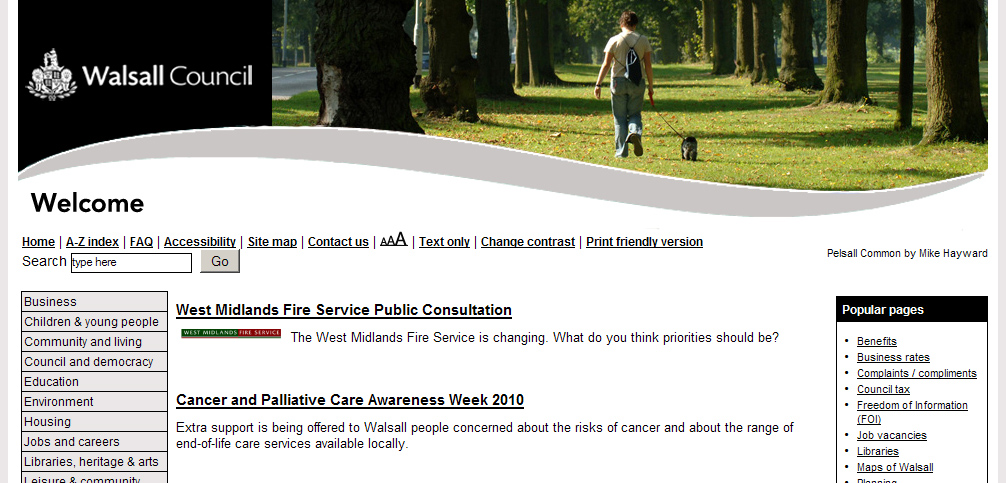
As part of a web refresh, Kev designed a Flickr friendly header that woud apply across all pages.

Next the pictures. A comment was posted on the Walsall Flickr pages to flag up what we were looking to do. We asked people to add the tag ‘walsallweb’ to each individual picture if they wanted the shot to be considered.

We were staggered to get more than 400 shots tagged for consideration in three days. An amazing response that showed the community support.

The postbox shape of the header ruled out scores of images. We also steered clear of people shots because of any problems with permissions.

The first shot was a canalside image. By linking back from the council site to the original Flickr image we embraced the web 2.0 approach of sharing.

The image got more than 150 hits in just over two weeks.

This is the revamped Walsall Council website that celebrates our residents’ work.

SIXTEEN THINGS WE LEARNED…

1. Ask permission. Photographic copyright by default lies with the photographer. Even if there is a creative commons licence available I’d still ask. Just to be on the safeside.

2. Ask permission to name and link back to the original picture too. For some people photography is a hobby they don’t want publicity for.

3. Rotate images. Try and use pictures from around the borough. Not just the photogenic park.

4. Rotate photographers. Share the love around.

5. Use freelance pictures too. But ask permission. The licence you may have originally negotiated may only be for print use, for example.

6. Be seasonal. A cornfield in summer sun looks great in August. It may not be so at Christmas.

7. Change the shot regularly. Two or three weeks is enough to freshen up the site.

8. Stage a competition to encourage participation.  Post a topic.

9. Use Flickr images across the site. A cracking shot of a park would work well on the park pages, for example.

10. Be aware of your policies towards people. Do you need to get permission forms signed in order to use the image for publicity.

11. Join Flickr. Contributing to the Flickr community is a good way to build bridges and understand how it works.

12. Acknowledge using a shot via a comment under the picture from the council Flickr account. Comments are a social part of Flickr and a way to give praise.

13. Create a gallery. A page on the council website to gather the header screenshots.

14. Stage a Flickr meet. Generate content and allow residents to take shots of their landmarks and building.

15. Showcase your area. It’s a chance to really show off.

16. Skill up. Make sure there is the skills base for several team members to add content.

LINKS:

bccdiy.com – A website for Birmingham put together by bloggers that uses Flickr images brilliantly.

Lichfield District Council – Some lovely shots of the Staffordshire city of Lichfield using Flickr.

San Fransisco’s District Attorney’s Office – Great blog on how a US office is now using photo sharing.

LGEO Research – Good blog by Liz Azyan on how Lichfield used user generated content.

Coventry – How Coventry City Council use Facebook to showcase official images.

SPEED DATA: Ideas for local government spending transparency

Only the wisest and stupidest men never change.

Confucius said that. Only, thing was he never worked in local government.

Speed of change in open data is blisteringly fast and getting faster.

In the Spring I thought all this would be important in 12 months time. Wrong. It was important TWO months later.

Local government in the UK has been asked to publish spending over £500 line by line.

A few months back Maidenhead and Windsor Council were hailed as a shining example of how to do this.

A few months on and the shine is wearing. Yes, they deserve praise for innovation but bright people have pointed out that you can do so much more if you publish a little bit more than a handful of categories.

Change was one of the themes of a session in Birmingham by Vicky Sergeant of SOCITM and hosted by Birmingham Council on the subject of publishing spending transparency open data.

It was a chance for people to bounce ideas and was an alphabetti spaghetti of a gathering with SOCITM, LGA and LeGSB.

Will Perrin from the Local Data Panel that helps shape data.gov.uk policy delivered a clear message:

There will be no spoon feeding from on high.

Eighty per cent of problems have been solved with blog posts such as this, he says.

It’s now down to councils to be brave and stand on their own two feet.

In the words of social media pioneers: Just Flipping Do It.

The combined efforts of the groups at the meeting are likely to publish at some stage some valuable advice on how best publishing spend can be put on line. These are things that struck me in the meantime.

Here are 12 key pieces of advice I took from the day

1) Publish open data-related FOI requests. Great idea. Further research shows you’ll have to be careful about publishing personal data not just in the name and address field but also in the text of the response.

2) The size of the dataset would double if it included ALL spend.

3) You can run a programme if you are clever to remove – or redact – at source personal data from social care and children’s services data.

4) You may need to make it clear to suppliers that this change is taking place. Not all are following this whole debate. In fact, I’d be amazed if any of them are.

5) Commercial confidentiality is a grey area. As Will said, the Information Commissioner’s presumption is to publish in the public interest but there is worryingly no case law to show where this has been tested.

6) Publish a unique identifier for your authority when you are publishing open data. Finance people will know what this is. It identoifies the line of data as being from a specific council.

7) Put an email address as a first point of contact for residents queries. Maybe people don’t have to go down a 20-day Freedom of Information response route first to get an answer.

8)Set-up an Open Data Panel in your council to keep-up the pace of publication.

9) Use the licence that can be found at data.gov.uk. It’s been looked at by government lawyers. Creative Commons while great hasn’t really been tested in  law in the UK.

10) There are a lot of codes in local government finance. If you don’t know what a CIPFA BVACOP code is make friends with someone who does.

11) Don’t plough a lone furrow. As a council or an officer don’t be alone. The Communities of Practice website is an excellent place to learn and discuss.

12) Guidance maybe getting drawn-up but don’t let this stop you. The LGA, SOCITM and others are looking what would work best. Don’t wait for them, however.

13) Communications is important. You need to explain it internally as well as to elected members, residents and suppliers.

14) Getting management on board. Yes, local government is being asked to do this. Yes, a enthusiastic volunteer is still better than 10 pressed men.

15) Publish monthly. Some in the web community are baffled as to why publication can’t be done at the end of every working day. As a compromise the Local Data Panel are saying publish monthly but within a month of month end.

Ian Carbutt from the LGA made some excellent points at the meeting. He points out there are three main areas that have several sections to them.

  • What and who its for: Local authority ID code, directorate, goods and services, service department.
  • Payment details: invoices, invoice number, net amount, VAT, gross amount, date of payment.
  • Supplier: name, contract title, supplier company number or VAT reference.

Pick from those three paints a better, more complete picture and may lead to fewer FOI requests.

LINKS:

Pezholio blog on the SOCITM Birmingham local data event. A useful summary and some very useful comments.

Creative Commons

Money: Glamlife

I LIKE: How Local Government can do Facebook

Heard the one about the council Facebook group with two friends?

It’s up there with forgetting the rings on your own wedding day for how not to do it.

Back in the day you had to be a fan of a council if you wanted to see what your council was doing on Facebook. Thing is, not everyone did.

As a platform, it’s a behemoth. Theres 500 million registered globally and more than 20 million in the UK.

Today there’s some brilliant examples of how Local Government can use it.

If you believe in the argument that you go where the debate is – and everyone sensible does – then Facebook is a must.

How to do it well as an organisation?  Go to Coventry. They do it brilliantly. Look, observe and learn.

The story of just how they do it is well covered in this blog by Steve Woodward from a talk given by Ally Hook at the Coventry and Warwickshire Social Media Cafe. There’s also this natty video of her talk if you want it direct.

Ally Hook is one of the good people on Twitter. I’d spoken to her before launching our own council’s Facebook fan page.

What’s her secret? Simple. The main messages I took are:

  1. Use the language of the platform.
  2. Be laid back.
  3. Don’t call yourself  ‘Council.’ Call yourself  after the area you represent, if you can.
  4. Don’t have a logo. They switch people off.  Have a nice picture of the place you represent.
  5. Don’t update too much. People will get bored and stop ‘liking’ you.
  6. You can delete abusive posts.
  7. Use a fan page not a Facebook group. You’ll get a breakdown of amazing stats on people who like you.
  8. Interact. Talk to people. They’ll talk back.

Coventry went from 300 to 11,000 in weeks when they started to use Facebook as an outlet for school closure updates.

There are other examples of good work too. Check out this exhaustive study by Ben Proctor . Belfast City Council do good things, as Ben quite rightly points out.

Should this be the only way Local Government uses Facebook? Of course not.

For venues and events it works brilliantly. Anywhere where there is a community it can work. People respond strongly to bricks and mortar far more than they do to institutions. Have a look at the Warwick Arts Centre, New York Public library or Solihull libraries.

Enjoy…

Creative commons: Facebook wants a new face SM Lions 12

CAKE TAPE: What cake and mixtapes can offer local government

'Mmmmmm, cake.'

Birthdays are natures way of telling you to eat more cake.

Marvellous, but what exactly does a slice of carrot cake have to say about local government?

Actually, quite a lot. So do mixtapes as a session heard at the excellent Localgovcamp Yorkshire and Humberside revealed.

Why? Two things. First, because it’s all about messing about on a project in your own time so you can learn by your mistakes.

Second, it’s about doing something in a fun, interesting, creative way.

Why Cake? As a wheeze I built a cake blog based on a rash of pictures of cake tweeted by friends from Twitter. It taught me how to crowdsource, how to use WordPress and where a decent piece of carrot cake can be found in the charming Shropshire village of Ludlow (At the Green Cafe since you were wondering. The review is here.) Stuart Harrison (@pezholio on Twitter) then raised the bar with a beer blog.

The excellent Sarah Lay picked up the baton and created a cake map. She got to know about Googlemaps as a result.

Mixtapes? Same principle. A tweet by Sarah sparked a series of blogs, a Flickr group and a Tumblr site. Why? Because mixtapes even in a digital world spark happy memories of taping the top 40 and crafting a tape to say ‘thank you!’ or even ‘actually, I quite fancy you.’

There was even a mixtape built by song contributions at the barcamp built with the help of Janet Davis (@janetedavis).

So what do cakes and tapes teach? In short, go away and experiment in your own time. You can learn. You can do fun things. Then you can transfer some of those ideas to your day job.

Amongst web developers, there is a useful saying: ‘fail forward.’ If you are going to fail, make sure you learn something about it so you can take things just that bit further next time. Messing about on a scheme allows you to do just that, risk free.

Links: Nice ideas that have emerged by messing around…

SOCIAL PHOTO: 11 groovy ways Flickr can be used by local government

There’s four billion reasons why Flickr is brilliant.

Four billion? That’s the number of images uploaded to it over the past five years.

Best bit? You don’t have to be David Bailey to get something out of it. You could be Bill Bailey.

What is Flickr? It’s a photo sharing website. You join as an individual. You upload pictures. You can add them to groups. You can comment on pictures too.

There are tens of thousands of groups on a bewildering range of subjects. Football? Check. Walking? Buses? Cricket scoreboards?  Clouds? They all have dedicated groups. There’s even one for Gregg’s shop fronts, believe it or not.

There are also geographical Flickr groups based on areas like the Black Country, Walsall or London.

Why bother with Flickr? Because a picture says 1,000 words. Besides, it’s a brilliant way to capture, celebrate and collaborate.

It’s a cinderella social media platform without a Stephen Fry to champion it. But there is a growing and exciting number of uses for it.

So what are the barriers for people to use it?

Like any platform, there are obstacles. None are insummountable.

There’s the usual cultural issues for an organisation using web 2.0. People can talk to you. You can talk back. You may have blocking issues too.

There may also be concern over images. Surely there’s room for dodgy pictures? Actually, not really. The Flickr community is a hugely civilised place. Your first uploads get checked over before they are seen. People comment constructively.

Isn’t it just for good photographers? No. Amateurs thrive here. Snap away.

How about copyright? Copyright is with the photographer. Even if you’ve commissioned it. Don’t upload someone else’s shots without their permission.

Eleven uses of Flickr in local government

1. Be a dissemenator – Stock photography – Newcastle  use it as a way of allowing stock photography to be disseminated. With photographers’ permission. Like Calderdale Council’s countryside team.

2. Be a campaigner – Create a Flickr group for a campaignWillenhall, Aldridge and Darlaston  in Bloom, for example.

3. Be a way to open-up museums – Create a Flickr group for a museum exhibition. Look at Walsall Museums.

4. Be an enabler – Set-up a Flickr meet. It’s a brilliant way to connect and collaborate.  Here’s my blog on this event from  a council perspective and from a Flickr photographer’s perspective from the excellent Steph Jennings and also Lee Jordan.

Here’s some shots from the Walsall Council House Flickr meet (see left) which saw the Flickr group invited into the Council House.

5. Be a Flickr Twitterer – Link to pictures via Twitter. Pictures are always more popular than straight forward links. They brighten up your stream.

6. Be a marketeer – Use Flickr pics for marketing. Leaflets can be brightened up with Flickr shots – with permission.

7. Be a Flickr webbie – Use Flickr on the council website. Like BCCDIY or Lichfield District Council, Brighton & Hove Council or the Walsall Council header.

8. Be a civic pride builder – Create a Flickr group for an area, like Sandwell Council did.

9. Be a picture tart – Post council Flickr pictures to different groups. Shot of the town hall? Put it in the Town Hall Flickr group.

10. Be a stock photography user – the Creative Commons is a licence that allows the use of shots with certain conditions. There is a category that allows for not for profit use, for example.

11. Be a digital divide bridger favourite walks or a way to celebrate heritage is an excellent way to encourage people to log on.

There’s eleven. That’s for starters…

Steph Jennings from the Walsall Flickr group and the Lighthouse Media Centre in Wolverhampton made some excellent points at Hyperlocal Govcamp West Midlands on how Walsall Council used images on their website.

This YouTube clip helps explain it:

This blog is based on a session at localgovcamp Yorkshire and Humberside in York (#lgcyh) which also had input from @janetedavis, @allyhook and @barnsley55.

Much kudos to the Walsall Flickr group and to the inspirational @essitam and @reelgonekid.

Creative commons: Smiling blonde girl Pink Sherbert Photography.

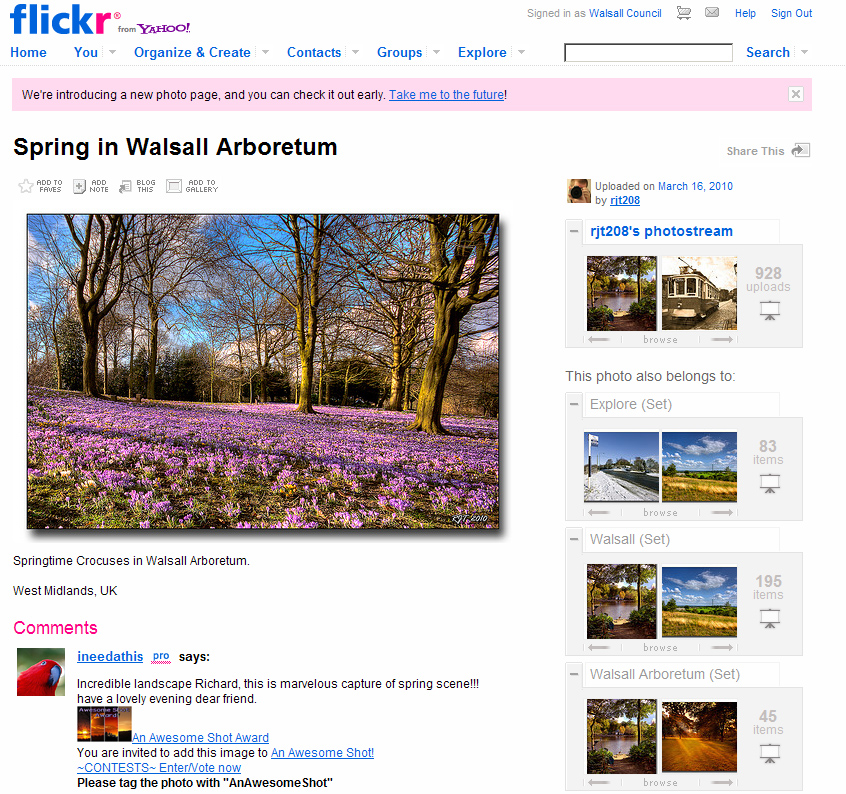
Flickr screenshot from the Walsall Flickr group pool.

Other pics by Dan Slee.

DAY TO DAY DATA: An idiot’s guide to what the open data revolution means for local government

Okay. Cards on the table. For the last 12 months I’ve been coming across geeks who have been banging on about data with a religious zeal.

You can see them wherever digital people meet-up with their Atari t-shirts and their Mash the State badges.

Internet creator Tim Berners-Lee a while back got an entire conference to chant ‘free the data!’ over and over.

Why?

What the flip is data? Why the flip should I be bothered? I’m just a local government press officer.

It was Tom Watson MP who I first heard talk about data in the summer of 2009 at the Black Country Social Media Cafe.

Gradually, after scores of conversations, blog reading and thinking it’s started to make some sense.

What has emerged to me is a picture of the potential for nothing short of a revolution. In life and by extension in local government.

What is data?

It’s information. It may be bicycle accidents. It may be crime figures. It may be the location of street lights or a leisure centre.

Pretty boring, yes?

On it’s own probably. But it starts to get really, really interesting when that information gets presented in an easily digestible way. Like on a map, say.

It gets even more interesting when several streams of information are put on the same map. It can make the world we live in look a different place.

The bicycle accidents map is a brilliant early example of how this can work.

Isn’t that only of interest to cyclists?

Yes, but that’s the whole point. It’s information – or data – that’s buried away which is fabulously interesting if you were a cyclist. You could find out where the accident blackspots were and avoid them. Or maybe campaign for something to be done about them.

The open street map is one such editable map with scores of snippets of data.

In the West Midlands, the MappaMercia project have kicked some ideas around. The gritting map of Birmingham is one example of turning data into something interactive. It plots gritting routes around the city which are treated in icy weather.

Start to make sense?

Here is a Q and A. It’s an idiot’s guide to data written by an eejit after talking and listening. It’s not a definitive. But it’s one take on what data will mean for local government.

What is data?

Data is information. Simple as that. Broadly speaking, this can be on a whole range of subjects. It could be weather data, news data, scientific data or government data. Even what time the 404A bus route runs from Cradley Heath to Walsall can be classed as data.

What about personal data?

All that stuff isn’t really of interest to enthusiasts who want to build maps and mess about with things. However, every time you use your Tesco Clubcard that data gets stored by Tesco. The supermarket giant then use that to build a picture of what lines are doing well and also a snapshot of your shopping habits.

Isn’t data available anyway?

If you are Sherlock Holmes and you look hard enough there’s a stack that could be found. But that’s just it. In the 21st century we expect more than just that information is stored in filing cabinets that may or may not be open to the public twice a year. In 430 different locations (one for every local council).

But isn’t data about bus routes and bus arrival times like, really, really boring?

To you maybe. But if you catch the 404A from Cradley Heath you’d want to know when the buses left and – here’s the nub – how reliable they were.

What is a ‘mash-up’?

This is where information has been taken and presented in a different format. On a fun level, the United Cakedom mash-up plots where cake reviews were carried out. There’s also a picture and a link to the blog that carried them.

Yes, but what does this mean for local government?

It means more transparency.

It means that people can see what is going on. It can also means that better informed decisions can be made by decision makers. That has to be good.

What would the average council officer think of making data freely available?

Frankly, they may be terrified.

Why?

If you are working at a particular coalface you may think that the information you are collecting is actually yours.

It can be sat on an officer’s hard drive and jealously guarded.

The officer may be worried at how this information plays out amongst residents. It could lead to criticism and awkward questions being asked. That’s democracy.

Why should local government officers not worry?

Frankly, many of the decisions about releasing data are being made at a very senior level in Government. More than 3,000 data sets – that’s packets of useful information – have been made available by the British Government via data.gov.uk.

Are there any amusing examples of data worry?

The Localgovcamp event in London recently heard of an example of how the Royal Mail stepped in to ask a council to stop mapping Victorian postboxes as the information ‘could be of use to terrorists’.

There was also the worry that a grit bin map could be used by grit thieves at a time of short supply.

What’s all this fuss about data.gov.uk?

This is a website for masses of data to be made available.

What sort of information can be found there?

It’s a range of public information from birth rates to accident statistics to death rates.

Isn’t data.gov.uk difficult to understand to the lay person?

Yes and no. It’s all in one place which makes a start. But the real beauty is when web developers get their hands on it and make easy to use applications like the iphone ASBOmeter that tells you where and how often anti-social behaviour orders are handed out by courts.

What about council websites? What does this mean for them?

Previously, there was effectively one door to knock on for council information. The council website. That’s changing.

As data becomes freely available anyone tech-savvy can build a website and display council data. Remember, as taxpayers it is effectively theirs.

Remember the bicycle accident site? People would be more inclined to go there rather than turn detective. See? See how it starts to work?

Do council websites do nothing then?

No, not at all. It means that as the bar has been raised to present information council web people will have to learn new skills. Interactive mapping is a must. Simply posting a pdf that won’t show up in a google search just isn’t good enough.

Is this political?

Different political parties are starting to construct policies around it. It’s not for me to comment on the rights and wrongs of those parties.

Undoubtedly, in local politics the trends and anomolies thrown up by open data will enter into the political arena.

So, this is all about big government then isn’t it?

Not really. There’s a stack of data collected by government both local and national.

There’s also a lot more which individuals create, either consciously or unconsciously. It happens every time you use the web, for example. Google checks where you are clicking so it can rank pages accordingly. When you follow someone on Twitter data is collected. Add a picture to Flickr and more gets created.

Can we go off as local government officers and build Google maps? And what about Ordnance Survey?

Err, no. No blog about the public sector and maps is complete without a line about Ordnance Survey. This is the state-owned organisation that licenses people, companies and state owned bodies, such as councils, for the right to use maps.

Open data people get really cross with OS. It’s our data, they argue.

Right now, there is a row going on between OS and Google which means that local government people can’t use Google maps. This may change in the near future.

Not heard enough? What does world wide web creator and brains behind data.gov.uk Tim Berners-Lee say about it?

There is a brilliant TED talk on data which should be required viewing. You can view it here.

During it (at about 4 minutes 30 seconds) he shows a clip of Hans Rosling using data visualisation to shatter a commonly held myth about poverty. People in non-western countries die early with big families. Right? Wrong. Not any more they don’t. He used birth and death data to create an animated chart to bring alive his argument.

The original talk by Hans is here.

This is what Tim Berners-Lee says: “Data drives a huge amount of what happens in our lives.

“I want to think of a world where everyone has put data on the web and so everything you imagine is on the web.

“I’m calling that linked data. It’s about making the world run better.”

If you were looking for a starting point, take a look at Tim Berners-Lee’s six minute film here on how that data stuff and people who knew what they were doing helped save lives in Haiti in 2010.

SIX things local government people can do:

1. Remember that data collected by local government doesn’t belong to local government. Or the officer that collected it. It belongs to residents.

2. Realise it’s going to happen anyway. It’s not your decision. Open data is often Government level.

3. Start using data to feed back into the decision making process. Maybe there is a site out there that can be used?

4. Raise the bar when presenting information on council websites. Think maps. Think RSS feed too.

5. Realise that data no matter how boring to you is madly interesting to somebody somewhere.

6. Look for data that can be made public. A map with layers to show who your councillor is, where the leisure centre is and where the library is is a start. Add past election results too.

Start to make sense now?

Creative commons credits

Data – Patrick Hoesly, Bike – Kicki, Seventies computer – AJ Mexico, Caramel – Matthew Murray, Handheld – Zach Klein, Tim Berners-Lee – Farm4Static.

WEB: So, what makes a good council website?

This was drawn-up after the ‘What makes an ace local government website?’ session at #ukgc10 by Liz Azyan from Camden Council and also the #ukgc10 WordPress session. Some extra thoughts were inserted after…

You’re in a rush. You’re going swimming. You’ve three minutes to find out when the nearest leisure centre closes… and you’re face with a council website.
 
This could be a pleasant experience and for many it is. But if you’re unlucky  you’ll be faced with a sprawling brick wall behemoth of a website written in a funny language riddled with jargon.
 
Oh, Lord.
It’s not gritting information, for example. It’s a winter service plan.   
Your opinion of your council suddenly plummets and you hurl abuse at the screen.
 
But ladies and gentlemen, it doesn’t have to be this way.
 
Liz Azyan’s session at the UK Government Bar Camp ’10 at Google was a thought provoking session with some cracking points.
 
Cards on the table at this stage. I don’t work in a web team. I work with them and more to the point I’m a council taxpayer who uses one.
 
Here are some points that emerged from the session — sprinkled with some that struck me afterwards.
 
What do people want?
 
They want to find the information they are after. Simple.


What do they often find? 
A website written in council speak with difficult to find pages presented poorly. In short a frustrating experience.
 

Tech frustration by CCB Images / Flickr

So, why bother with a council website?
 
It’s an argument that – surprisingly – seems still to exist in some quarters. Isn’t it just a big waste of money? Actually, no. Quite the reverse. After getting attacked for wasting money by TPA Lincolnshire Council responded with a cool, calm and brilliantly argued piece that argued that the cost of web was staggeringly lower than employing people to help face-to-face or over the telephone. It’s worth taking a look at.
 
What’s the average cost of contact via a council website?
 
For contact, read an occasion a member of the public needs to contact the council.
 
            Face to face              £7.81
            Telephone                  £4.00
            Online                         £0.17

 
Which does make you think. Vast resources get put – rightly – into a help desk or a one stop information shop. Often, web is seen as a poor relation.
 
There is also a theory that telephone numbers should be hard to find. If you have cost savings in mind pushing people towards the £4 option may not make good sense.


Do Local Government websites pay enough attention to design and appearance?
 
The hell they do. Some of them look utterly dreadful. There’s an organisation called SOCITM who seek to raise standards in government. Every year they survey Local Government sites on a checklist. Accessibility is key. So is usability. But nothing seems to get assessed on design.
 
One point that Devon’s Carl Haggerty made very strongly – which I totally agree with – is the need for this to change. Design and look IS important. If the website looks poor people won’t even get as far as starting a search.
 
As someone who has worked on newspapers and has put together magazines the look of something is fundamental. Look across the news stands. From the unscientific straw poll in the session colour seemed to be important.
 
Why should we bother to make websites better?
 
We need to improve because people’s expectations are higher.
 
We need to improve because at a time of tighter budgets web is a cost effective solution.
 
We also need to improve because while once council websites had a virtual monopoly on local information those days are changing.
 
As barriers are lowered – by things like WordPress and by the surge in hyperlocal blogs – others can do the job themselves. The case of the tech-savvy Birmingham residents who knocked up their own council website – bcc.diy.co.uk should send wake-up calls throughout local government. If you don’t do it, they are basically saying, someone else will.
 
As more and more data gets released web developers will find their own uses for it. Leisure centres? There’s an app for that. The days of the council website being a monopoly are ending. Smart people are just starting to wake up to that.
 
Yes, but it’s all about the home page, isn’t it?
 
The figures can vary widely. Around 15 per cent of people came onto the site through the home page from one council. That’s not much more than one in ten. A piddling figure. Especially when you take account the time and effort that goes into it. But in another council researched after the session was around 90 per cent.

Brent Council's opt in less busy webpage.

The moral of the story to local government webbies  is to research your web stats before changes are made.
 
 
Can you make your homepage less busy?
 
Yes. Brent council offers the option of the traditional busy page and a more simple one. That quite appeals to me.
 
So how do people navigate around your site if they do do that?

 
There’s your website search box. Which often isn’t that great. Even if it’s a google one, apparently. From the experience of several councils much time and effoft is wasted bu users here.
 
There’s your A-Z of services too.
 
There’s also the postcode search which to me seems rather attractive and far more relevant. If I lived in Baswich in Stafford, wouldn’t it be better to tell me what was on offer for me there?
 
There’s also the novel idea of a pictorial map. You point at it. You hover over the bits you want and you click through there. Directgov have a rather attractive planning map that does that.
 
Widgets. Redbridge Council have use this. It’s a similar theory to the igoogle approach where you compose the page that you want from the information that you want. The idea is great but feedback suggests that only small numbers of people have embraced this
 
The message from Liz’s session was that as far as search is concerned you need to pick one way and stick to it. Sites that try and do absolutely everything in the way of search look cluttered, busy and turn people off.

How about open source (and what the hell does that mean?)

At the WordPress #ukgc10 session the idea of WordPress as a web content managament system was talked about. There is much going for it. It’s open source. Which for non-geeks means that you don’t have to pay someone a lorry load of cash to buy it and maintain it. It’s free. You can download it from www.wordpress.com and web developers who know what they are doing can build you widgets so you can customise things to suit your ends.

The downloadable version of WordPress is from WordPress.org while WordPress.com is where you get your hosted versions.

There are plenty of examples of Government using open source. The 10 Downing Street web site relies on it in parts for it’s press operation. So do almost half UK government departments in one shape or another. It’s great if you need an emergency website knocked up at short notice.

However, the feedback was that there was  a 500-page limit on WordPress. That’s probably more than enough for some sites but bigger projects may be hampered by that limitation.  

But how about the Birmingham City Council experience? (insert clap of thunder here.)

There has been plenty written about the Birmingham experience. But if you haven’t come across it it’s a tale to strike fear into local government web managers up and down the land.

In short, Birmingham City Council appointed consultants to build their website. The final bill was more than many expected and wasn’t as good as people were expecting. It led to Press criticism.

The Birmingham bloggers build a DIY site when they were less than impressed with the council version.

There is a thriving community of bloggers and the digitally-connected in Birmingham. They decided to build their own DIY council site by taking the data that was publicly available and constructin their own website.

Based on open source and while it may look rough at the edges, it is a site born of social media and built by community-spirited people eager to do their own thing. That it cooked a snook at authority to boot was for some a bonus.

They came up with something based on a postcode search and using stunning Flickr imagery of their home city.  

It’s legacy will be more than a website. It’s legacy is a warning shot that internet users have a powerful voice and if you don’t provide them with something they’luse and be impressed by, they may well build their own. As a warning shot to council it’s there to be heeded.

So, how about asking people what they think of your site?

I’m impressed with the Camden Council Facebook group set up to see what people thought of their site. An impressive use of social media. Bold, imaginative and connecting directly to the online community. Magnificent. And a template to follow.
 
 
In a nutshell: So what would NINE really good things to do be?


1 Use pictures better. Pictures tell a 1,000 words and are a brilliant way of showcasing your organisation. Not just the arty commissioned ones. The Flickr ones too.
 
2 Choose a way for people to navigate about the site. And stick to it.
 
3 Don’t make your site busy. It looks awful. Simplicity works.
 
4 Don’t get too hung up on the homepage. Remember that few people can get onto your site that way.
 
5 Speak to the people in the calls centre. What subjects come up most often?
Shouldn’t that play some role in what appears on the homepage? And be well designed and put together?
 
6 In an A-Z of services think Yellow Pages. Put links in several places. For example, people could be looking at household waste in several places. Waste, rubbish or even trash
 
7 And finally, wouldn’t it be good if SOCITM took more account of design and look? That way we may all have better websites.

8 Use social media to see what people think. Use Twitter and Facebook. If social media is about a two way conversation then what better way of connecting with web-savvy citizens? 

9 Don’t rule out open source. It’s free. And one day someone with vision will come up with something that government can use.
 
Input for the #ukgc10 ‘What makes an ace website?’session included points from Dan Harris, Ally Hook, Liz Azyan, Sarah Lay, Martin Black, Stephen Cross and Andrew Beeken.

Flickr pics used with creative commons licence laptop (Jason Santa Maria) and frustration (CCB Images).

SOCIAL MEDIA: Your EIGHT step guide to getting started…

This blog post was inspired by #ukgc10’s local government hug session where one person asked for help in how to get started with social media. Some good pieces of advice came out. Here are some from the session and some that struck me afterwards…


THE 8 STEP APPROACH FOR GETTING STARTED….

You’ve read about social media. You may have thought it was a fad. Now you’ve been waking up at 3am with the gnawing thought that you’ll have to do something.

If you’re at this stage. Congratulations. You’re sharp. You’ve seen which way the wind is blowing. And, yes, it’s only going to blow harder.

So what to do?

Here’s some thoughts on how to go about turning your organisation into something fit for the 21st century.

It’s simply not enough to say that you must do it because Steven Fry does it. Or because it’s cool.

You need to construct a cohesive and persuasive argument backed by figures that will work with people who look on digital with the suspicious eye of a Daily Mail reader.


Step 1 – Look at the national picture.

More than 30 million people use social media in the UK, according to the most recent figures. Clicky Media’s figures are a good starting point.

You can compare this to national and local newspaper figures.

Locally, a 20 per cent dip in local papers is predicted by 2012 in weekly papers. In regional daily papers it’s more like 30 per cent.

In short: If you’ve always relied on your local paper to get your message out then think again.

Step 2 – Have a look at the sites.

There are dozens of social media sites.

For the sake of argument, look at six of the most popular sites.

YouTube, Facebook, Twitter and Flickr all do different things. For blogging, WordPress and Blogspot are key.

Don’t worry if it all looks an unclimbable. Rome wasn’t built in a day. Anyway, Microsoft billionaire Bill Gates has only just got round to joining Twitter himself. So, relax.

Join one if you like. See how it works. Get to know it.   

In short: Don’t worry about not getting your head around all of them.
Get your head around them one at a time.

Dive in! That water is great….


Step 3 – See what some inspired people say.

All you need is out there on the internet. The trick is, like anything, knowing where to look. You’ll find it a creative, inspiring and sharing place if you choose to join.

Check Mashable for basic guides to all this stuff. The guide to social media is a must. Follow the link and click download for Learning Pool Twitter guide.

There are some quality blog posts on the subject. Michelle Ide-Smith recently wrote a post that nails how to construct an argument in favour.

Have a look at these blogs for ideas an inspiration:

Nick Booth, Dave Briggs, Sarah Lay, Carl Haggerty.

If you join Twitter – and I’ve learned so much from it I’d seriously recommend it – I’d also recommend these:

@sarahlay – Derbyshire webbie.
@alncl – Alastair Smith, Newcastle web man.
@davebriggs – Local government social media specialist.
@timesjoanna – Former Birmingham Post reporter turned Times writer. Great for links.
@liz_azyan – Lives and breathes local government and social media.

@gecko84 – Teckie Arsenal fan.
@abeeken – Lincolnshire webbie.

@mmmmmmcake – A stream about cake, believe it or not.

@pezholio – Local gov webbie from Staffordshire who is borderline genius. Also likes real ale.

@talkaboutlocal – a window into the amazing world of hyperlocal blogs that can serve a town or even a housing estate.
@wv11 – a hyperlocal blog based in Wednesfield, Wolverhampton. Shows how a local site can use it.
@philipjohn – a website developer who is a useful font of information.
@mashable – the Twitter version of the social media blog.
@doristhecow – Anchor butter’s well judged use of Twitter. I love it.
@scobleiser – Silicon Valley geek who writes about tech news.
@walsallcouncil – Because their use of social media is really, really, really inspired (disclaimer: I help write it).


Step 4 – Create a social media map.

Work out what activity there is in your area. These figures are a clincher so take an afternoon out to build this picture.

Paul Cole and Tim Cooper in Derbyshire did one for their area. They used mindmeister although you could use an exercise book. It’s just as good and you don’t have to re-boot it. It lists all trhe social media activity they could find.

How?

Before you do, I’d find out the circulation figures for newspapers in your area. This is good to compare and contrast. The Walsall edition of the Express & Star, for example has sales of around 22,000.

For Facebook, there are 23 million users as of January 2010. Want to see how many are local to you? Log onto Facebook, then click the button marked ‘advertising’. Fill out an ad. Don’t worry you won’t get charged just yet. It’s then you reach the section that gets really interesting.

Here, you can ask Facebook how many people are registered within a 10 mile radius of a town. This gives some staggering figures. Click the box marked ‘location’ and put in the town you want to aim at.

In Walsall, in January 2010 there are 170,000 people on Facebook within 10 miles of the town. The population of the borough is around 250,000 and the 10 mile radius also spills out into part of Staffordshire, Birmingham and Wolverhampton. But, you get the picture.

There are therefore, around eight times as many Facebook users as buy copies of the Express & Star in the wider Walsall area, you may argue.

For Twitter, it’s harder to work out your area’s figure. Nationally, by November 2009 there are 5.5 million UK users. You’ll have to work out your area’s percentage of the national population, then divide the Twitter users by that percentage.

For YouTube, log on and search for your area or town. You’ll be surprised. Using the keyword ‘Walsall’ gave just less than 5,000 clips.

Same with Flickr. This is a photo sharing website. Count how many images of your patch there are. The Walsall Flickr group of more than 80 members, for example have around 5,000 iamges of their home borough.

WordPress and Blogspot. Search for your areas and they’ll crop up on blogs.


Step 5 – Get your arguments ready

There’s a brilliant few resources online with the most common arguments against social media and the counter arguments to deploy.

They work a treat.

Jeff Bullas’ blog on the subject is useful. So is this from SEO Blog. Google the word ‘reasons to use social media


Step 6 – JFDI Just flipping do it.

Now, if you are particularly brave you can cut to this one skipping step four entirely.

The argument goes like this. Just flipping do it. By the time anyone important notices it’ll have reached critical mass and harder to close down.

It’s not something I’ve done but other far braver people have and with great success. Will Perrin – @willperrin on Twitter – often talks about how he deliberately avoided asking permission to launch Downing Street’s petition site.


Step 7 – Call in an expert.

There’s a good quote about a Prophet never being recognised in his own land.

The translation of this is if you think they won’t listen to you they may listen to someone from outside.

It’s worked on several occasions with local authorities who have called in Nick Booth’s Podnosh company. Dave Briggs and Simon Wakeman from Medway Council have done similar jobs.

However, do be careful of people who call themselves social media experts. Or ninjas. Or any such rot. They’re almost certainly not and there are plenty of snake oil salesmen about right now.


Step 8 – Keep winning the internal argument.

Now you are up and running as nobody will be able to counter such stunning arguments it doesn’t end there. No, sir.

The social media head of one of Britain’s main parties once said that up to half his job is taken up with winning the internal argument.

Report back progress and keep a measure of followers and activity.

Banning social media is rather like trying to outlaw the telephone in the 19th century.

It’s a communications channel. We need to embrace it. Smile. It’s the future. And your children’s.


Pics: Used under a creative commons licence, Amit Gupta (Facebook), Badjonni (swimmers),  Dan Slee (Newlands Valley), Sean Dreilinger (mobiles) and the Little Tea Cup (Dan Slee).

Exit mobile version